SoundSense - Hearing Aid Companion App
Overview
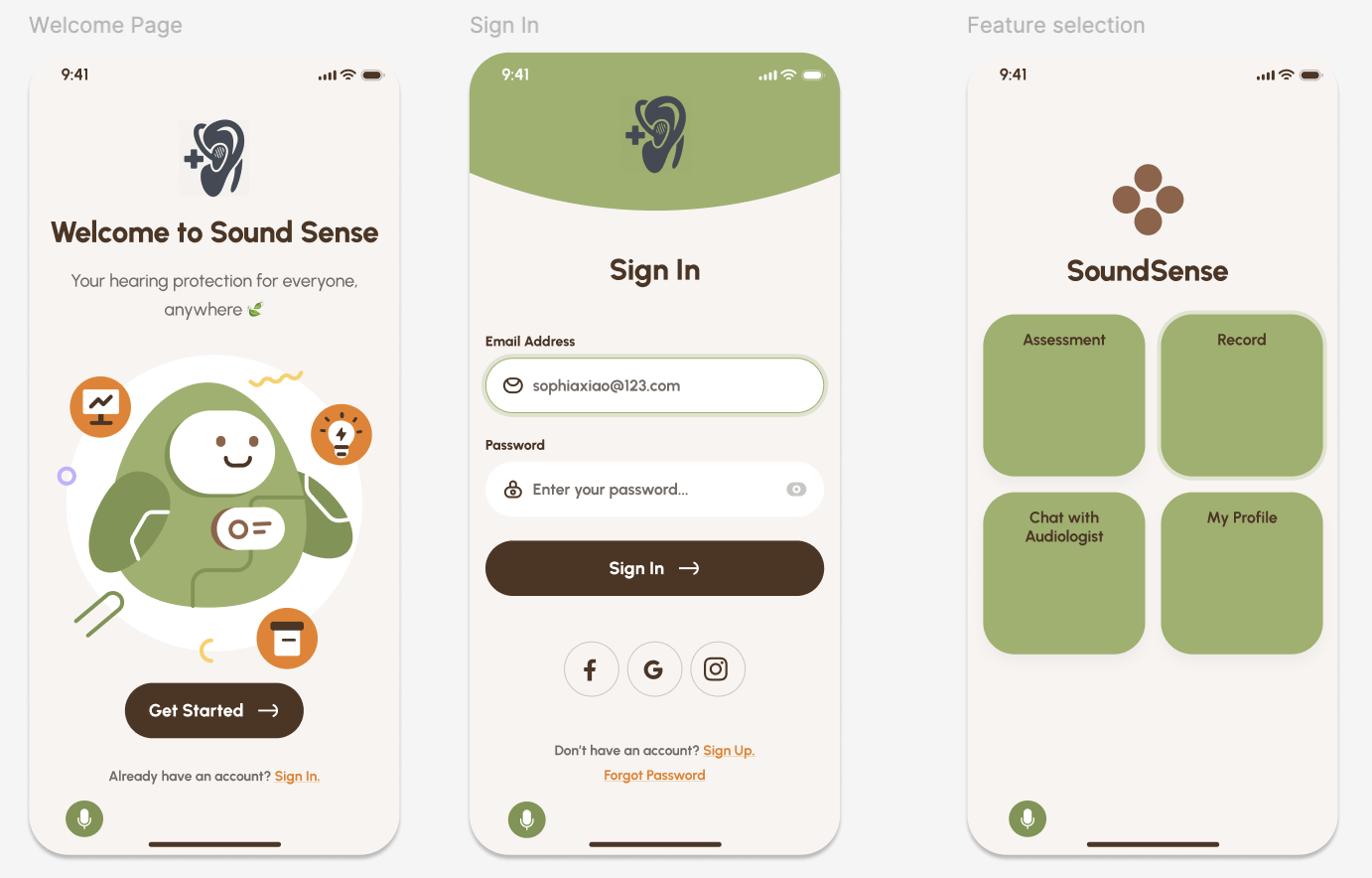
SoundSense is a mobile companion app designed to help hearing aid users better understand, personalize, and manage their hearing experience. The app bridges the gap between users, audiologists, and hearing technology by providing real-time environmental sound recording, personalization controls, and accessibility-centered interaction features.
This project was completed over a 10-week academic quarter. I worked as a UX researcher and product designer, conducting stakeholder research, contextual inquiry, and translating accessibility needs into product requirements and prototype features.
My role focused on understanding the complex ecosystem surrounding hearing technology and designing solutions grounded in real user needs, clinical workflows, and accessibility constraints.
My role: UX Researcher, Product Designer, Project Manager
Timeline: 10 weeks
Team: 3 students
Stakeholders: Hearing aid users, audiologists, researchers, and assistive technology ecosystem
Problem & Opportunity
Hearing aid users rely heavily on companion apps to manage their devices, yet many existing solutions fail to provide meaningful personalization, accessibility, or actionable insight.
Through stakeholder mapping and contextual research, our team identified several systemic challenges:
Users struggle to understand and adjust hearing settings in different environments
Audiologists rely on delayed feedback during appointments rather than real-time environmental data
Accessibility needs vary significantly depending on age, motor ability, and visual function
Users often lack tools to capture and communicate problematic listening situations
Patients often require ongoing adjustment and training to adapt to hearing technology, involving repeated clinical visits and device tuning. This creates an opportunity for technology to improve communication between users and clinicians while empowering users to manage their hearing more independently.
This revealed an opportunity to design a system that improves accessibility, personalization, and feedback between users and providers.
Research Approach & Rationale
I conducted research focused on understanding both user needs and the broader hearing technology ecosystem.
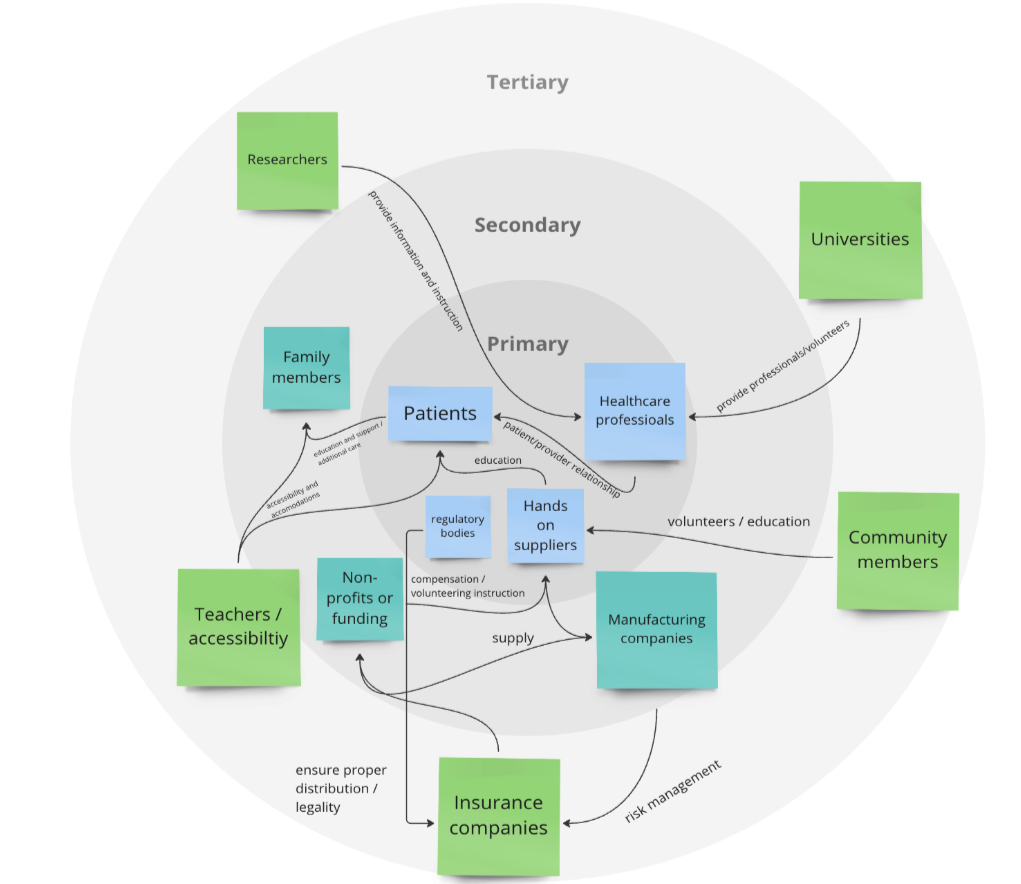
Stakeholder Mapping
Analyzing the full ecosystem surrounding hearing technology, including patients, audiologists, researchers, manufacturers, and healthcare systems
This process revealed that hearing technology exists within a highly interconnected system involving clinical care, accessibility requirements, and technical device constraints.
Contextual Inquiry and Expert Interview
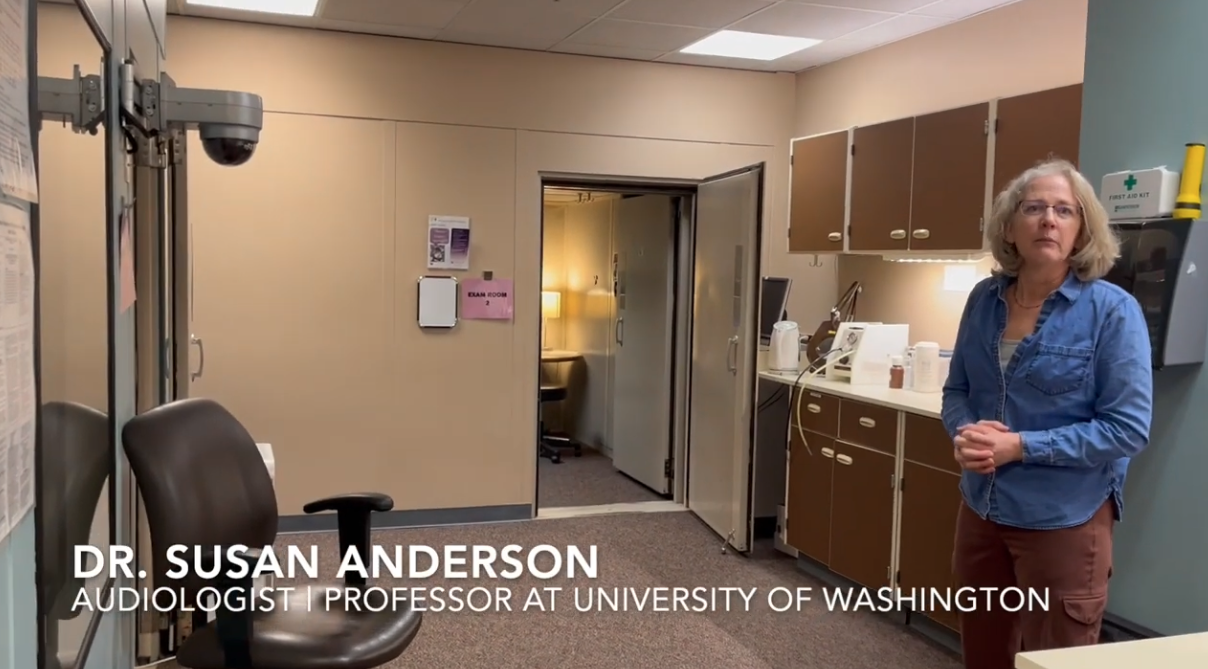
Conducting contextual research through interviews with an audiologists and design engineers. This provided insight into:
How users interact with hearing aid companion apps
Common pain points in hearing aid adjustment and management
Clinical workflows and feedback limitations
Accessibility needs across age and ability levels
These interviews directly influenced our product direction and feature prioritization. The audiologists emphasized the need for tools that allow users to record environmental sound to help diagnose device and listening issues. They also emphasized simple navigation, ease of communication, and the ability to personalize the number of features available on the application due to varying levels of technical literacy. Users also reported friction during transitions between hearing aid brands due to differences in companion app design and functionality.
Accessibility
Using my background in speech and hearing sciences, I analyzed how hearing loss, aging, and accessibility constraints affect interaction patterns. Because hearing aid users may also experience visual impairments or motor challenges, accessibility had to be a foundational design principle rather than a secondary feature.
Key Insights & Impact
Insight: Users struggle to communicate hearing difficulties after the fact.
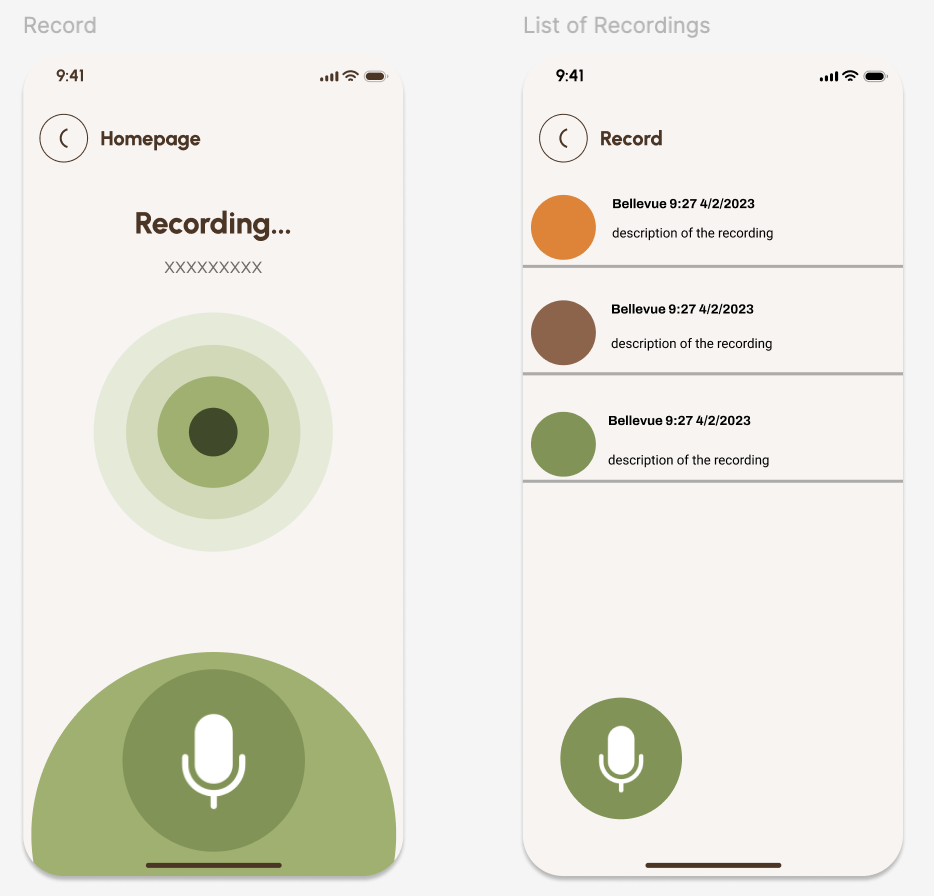
Design impact: Design an environmental sound recording feature that allows users to capture problematic listening situations and share them with audiologists.
Insight: Users differ in technical ability, age, and motor or visual function.
Design impact: Design customizable interaction complexity, allowing users or caregivers to simplify or expand functionality.
Insight: Users have different hearing preferences and environmental needs.
Design impact: Design personalization controls and customizable onboarding to align with individual needs.
Insight: Audiologists rely on patient feedback to adjust hearing technology.
Design impact: Design features that improve communication between users and clinicians by providing more actionable data.
Components & Constraints
Key components:
Environmental sound recording feature to capture real-world listening challenges
Personalization controls for hearing environment preferences
Accessibility-centered interaction design
Flexible interface complexity for users and caregivers
Hearing health education
This project required balancing multiple constraints:
Limited 10-week academic timeline
Limited access to real hearing aid users
Technical constraints of prototype-level implementation
Need to design for diverse accessibility requirements
User Testing
To evaluate SoundSense, we focused on two core questions:
Is the app intuitive to use, and can users effectively personalize their hearing experience?
We used two complementary methods: closed card sorting and usability testing with surveys.
Card Sorting (Information Architecture Evaluation)
We conducted a closed card sort with participants to understand how users naturally grouped app features and whether our information architecture aligned with their mental models. Participants consistently grouped features related to hearing health (e.g., auditory training, maintenance, and health tips) together, and strongly associated communication features such as “Chat with an Audiologist” with support and troubleshooting. Customization and accessibility controls were also clearly recognized as a core category. However, participants showed less agreement around technology-integration features like Bluetooth pairing and streaming audio, suggesting these components needed clearer organization and labeling.
Usability Testing & Survey
Participants explored the prototype independently before completing a usability survey based on the System Usability Scale (SUS), along with open-ended feedback questions. Overall, users reported positive usability and strong interest in the app’s personalization features. Participants particularly valued:
Sound recording functionality
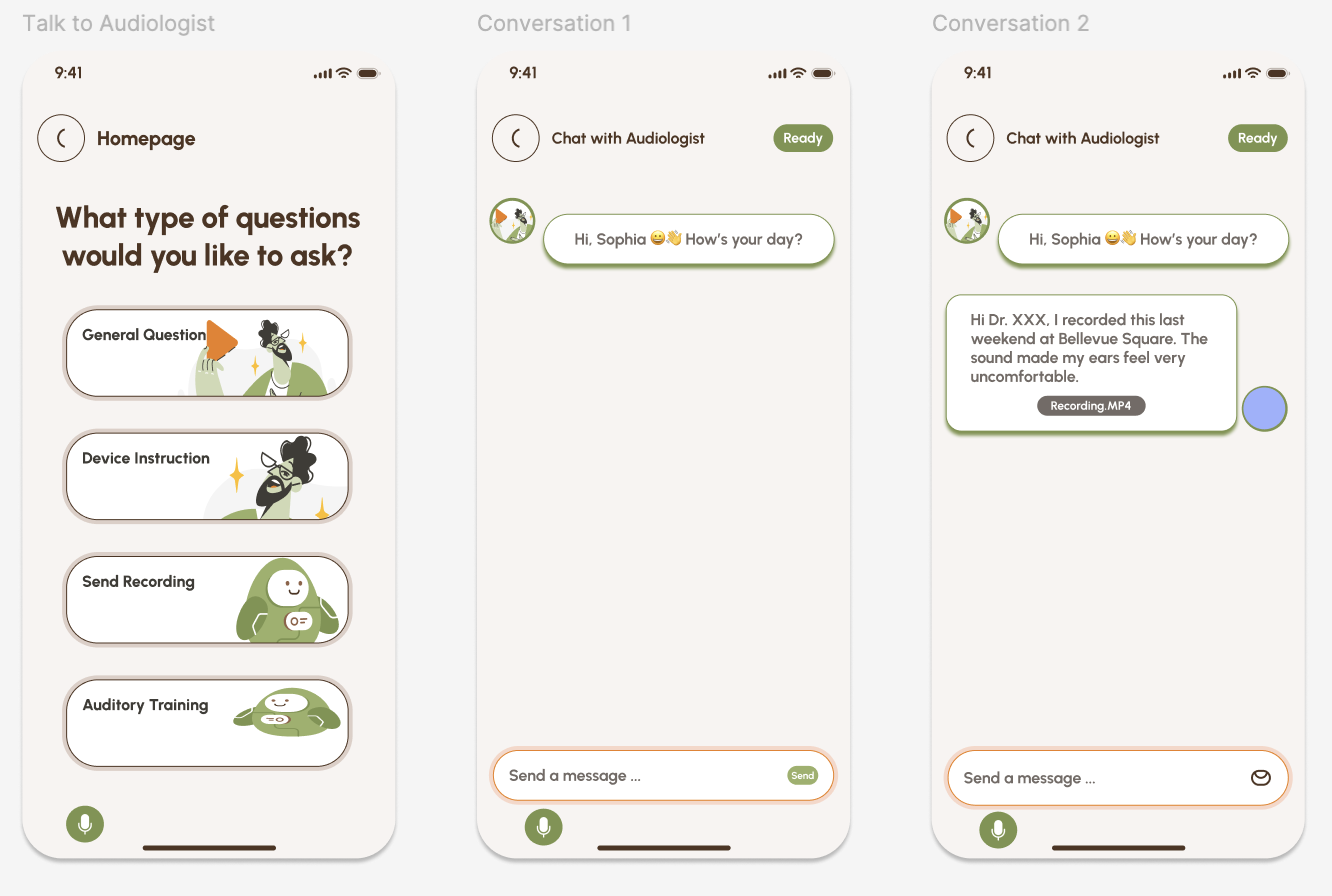
Audiologist communication features
Customizable hearing settings
Clear onboarding instructions
At the same time, testing revealed opportunities for improvement. Some participants experienced confusion around terminology, navigation to audiologist support, and understanding certain customization features. Participants also suggested adding interactive tutorials and stronger real-time feedback cues.
Iteration Based on Feedback
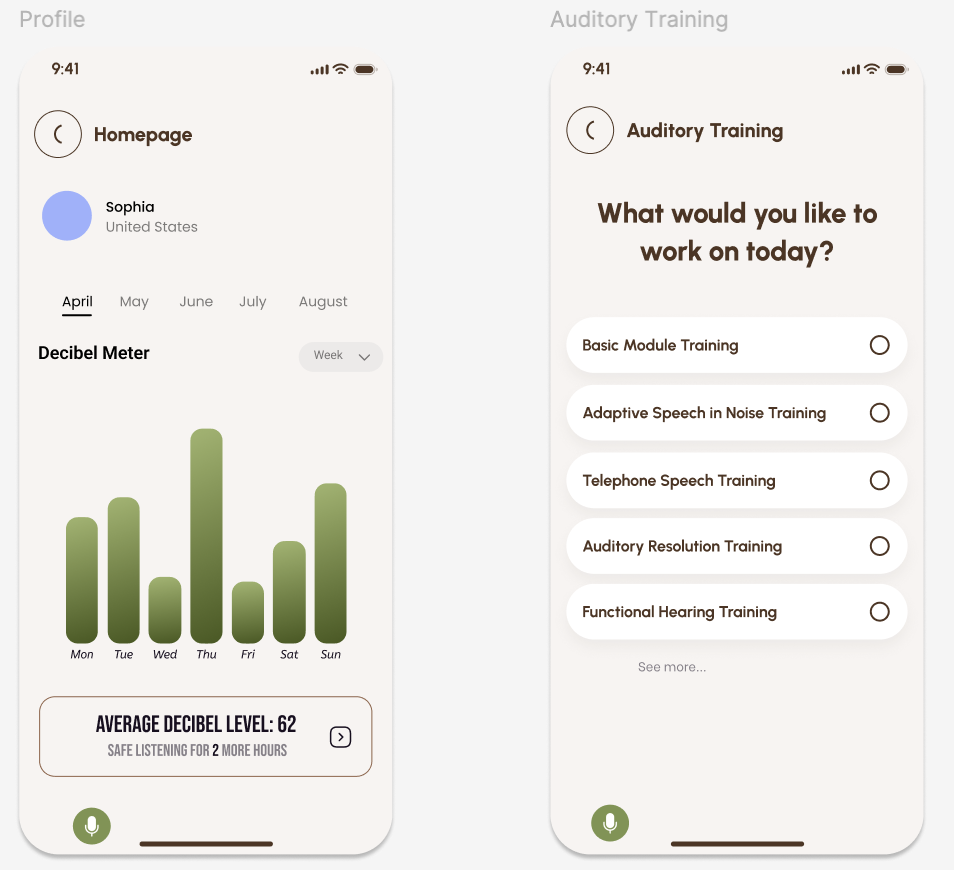
User feedback directly informed design changes. For example, we expanded the “Talk to Audiologist” feature to allow users to select different types of auditory training, improving personalization and usability. We also improved the profile and progress visualization experience, adding histogram-based decibel tracking and time-based filtering to help users better understand their hearing environment over time. These iterations reinforced the importance of designing for clarity, accessibility, and user control in assistive technology applications.
Limitations
This evaluation was conducted within a university course timeline and relied primarily on participants from the University of Washington community. While this provided valuable usability insights, future research with a broader population of hearing aid users would strengthen findings and improve generalizability.
Outcome & Reflection
We developed an interactive high-fidelity prototype in Figma demonstrating:
Personalized hearing controls
Environmental sound recording functionality
Accessibility-centered interaction features
Hearing health education
Audiologist communication
This project strengthened my ability to conduct UX research in complex, accessibility-focused domains and design for users with diverse sensory and physical needs.
It deepened my ability to:
Conduct stakeholder and ecosystem analysis
Design and conduct interviews
Develop an evaluation plan for usability testing
Translate accessibility research into actionable product features
Design for assistive technology contexts
Balance user needs, technical feasibility, and system constraints
As someone with academic and professional experience in hearing science, this project reinforced my interest in accessibility-focused UX research and assistive technology. It reflects my goal of designing technology that improves human communication, accessibility, and quality of life.
Future iterations of SoundSense would focus on expanding accessibility and personalization across different user needs. For example, refining the color system to avoid red–green contrast would improve usability for users with color vision deficiencies, one of the most common forms of visual impairment. The interface could also support adjustable complexity levels, allowing users, caregivers, or audiologists to simplify or expand functionality based on comfort with technology. From a technical perspective, a real-world version of SoundSense would require collaboration with hearing aid manufacturers to ensure compatibility across device brands, as integration standards and APIs vary across companies. Additionally, our usability testing would expand to additional demographics and hearing aid users.
Stakeholder Map